
Your professional color science suite
ColourMatch is the result of years of research and development to give filmmakers, DOPs, and colorists access to tools that up until now were reserved only for high-end studios and specialized post-production houses.
What is it?
ColourMatch isn't just a single tool—it is a complete suite of four powerful engines designed for mathematically accurate camera matching, film profiling, and look development. Powered by an advanced matching algorithm, it gives you total control over your color pipeline.
It includes:
The Measurement Tool: Extract precise RGB values directly from your input images for accurate analysis.
The Match Engine: Our core algorithm that allows to match cameras and profiles film stocks with state of the art mathematical precision.
The Curve Editor: A dedicated interface to manually fine-tune LUT curves for perfect creative control.
The LUT Smoother: A LUT smoothing tool that allows to repair broken LUTs and smooths out gradients to prevent banding and breakage,
Who is it for?
ColourMatch is designed for Filmmakers, DOPs, and Colorists who require valid, data-driven color science in their workflow. It brings the capabilities of a high-end color lab to anyone who needs to push beyond the limitations of standard tools.
It is specifically built for professionals facing complex color challenges, such as:
1. Seamless Camera Matching When a project is shot with two different cameras—for example, a Sony FX3 (B-cam) for action sequences and an Arri Alexa (A-cam). The footage needs to cut together seamlessly. While a standard Color Space Transform is a good starting point, it often cannot get you all the way there. If you need higher fidelity, ColourMatch allows you to match the Source camera to the Target camera with an unprecedented level of accuracy, ensuring the sensors align perfectly.
2. Advanced Film Profiling When a project requires a specific film look, or a DOP prefers shooting digital for flexibility but wants the image to behave like a particular film stock. Most film profiles and emulations on the market look good in some scenarios but completely fall apart in others. With ColourMatch, you can build incredibly accurate 3D LUTs that map the digital camera’s sensor response directly to the film stock’s response. This allows DOPs, colorists, and studios to develop Show LUTs built on measured data that respond accurately in any scenario.
The Toolkit
OVERVIEW

MEASURE - The RGB Sampling Tool
Reliable Data Extraction. No Guesswork.
The quality of any color transformation is mathematically limited by the quality of the input data. The Measure Tool is designed to extract precise, noise-free RGB values from your footage, serving as the foundation for the entire ColourMatch workflow.
Most commercial matching tools rely on "Image Recognition" to automatically find color charts. While convenient, these algorithms often fail if the chart is upside down, partially obscured, poorly lit, or if you are using a non-standard reference target.
ColourMatch takes a deterministic approach. By using manual coordinate systems, you are not tied to specific chart brands or perfect conditions.
Universal Compatibility: Measure any ColorChecker, a proprietary printed patch, or even specific skin tones or fabrics in a scene.
Robustness: If you can see it, you can measure it. The tool relies on explicit X/Y coordinates, ensuring 100% reliability regardless of the image content.
MATCH - The Color Matching Algorithm
Most color matching tools rely on simple 3×3 Matrices or basic linear regression. While this works for aligning white balance, it fails to capture non-linear complexities especially when it comes to matching the response of a film stock. ColourMatch moves beyond these limitations by utilizing a Non-Linear Volumetric Warping engine.
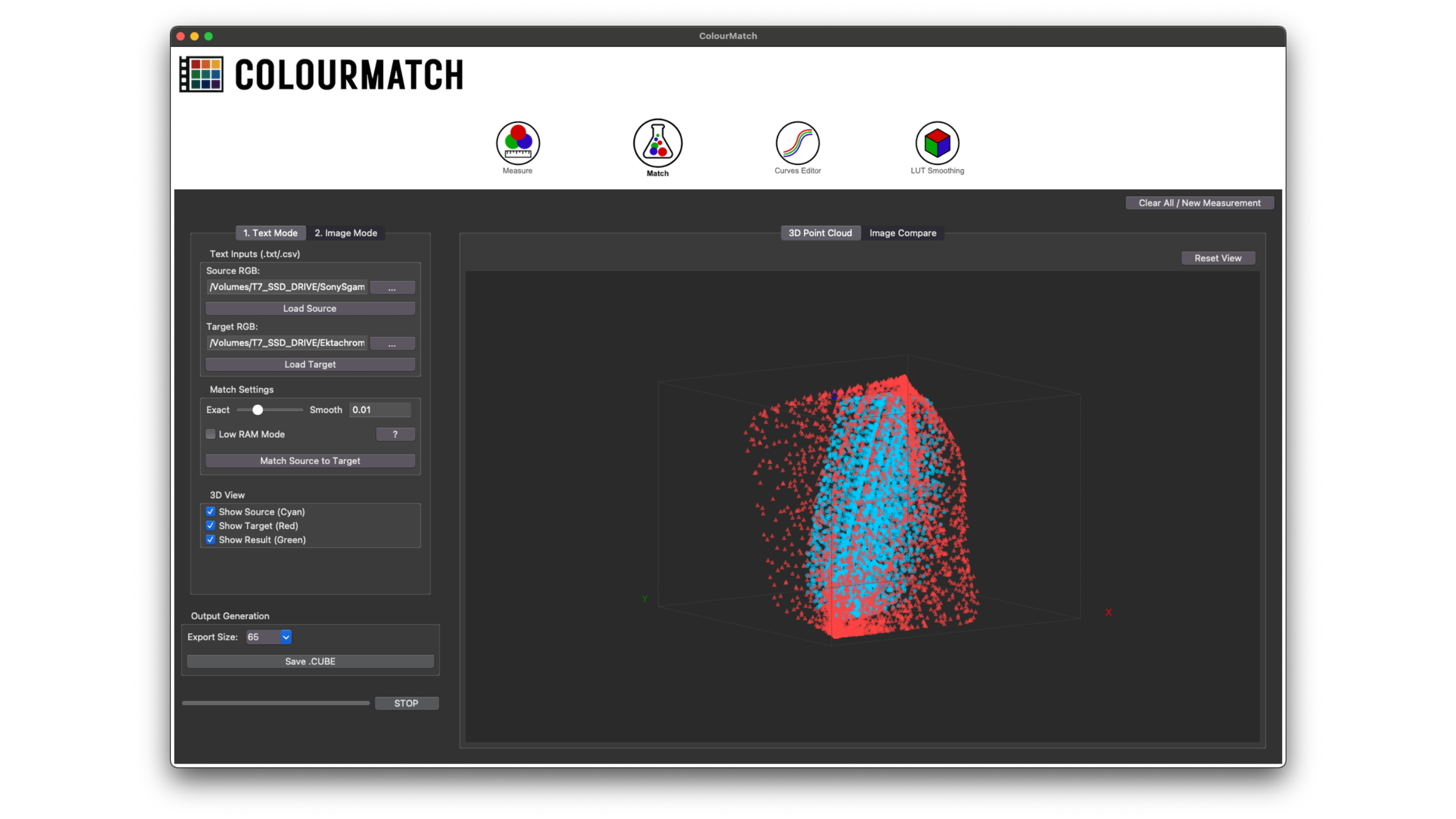
The Core Algorithm is found in the “Match” tab. Here, you input your Source and Target datasets and visualize them side-by-side in 3D space. The algorithm then calculates the necessary warp to map the Source dataset to the Target. The final color transformation is stored as a 3D LUT for use in DaVinci Resolve, Premiere, Final Cut, or any compatible NLE.
Because the engine uses energy-minimization math, the quality of the transform is directly tied to the quality of your measurements. Therefore, it’s important to make sure the datasets are accurate and represent a wide range of colors. Providing sparse or noisy data may result in a less precise match, as the solver attempts to fit the volume to the provided points.
CURVE EDITOR
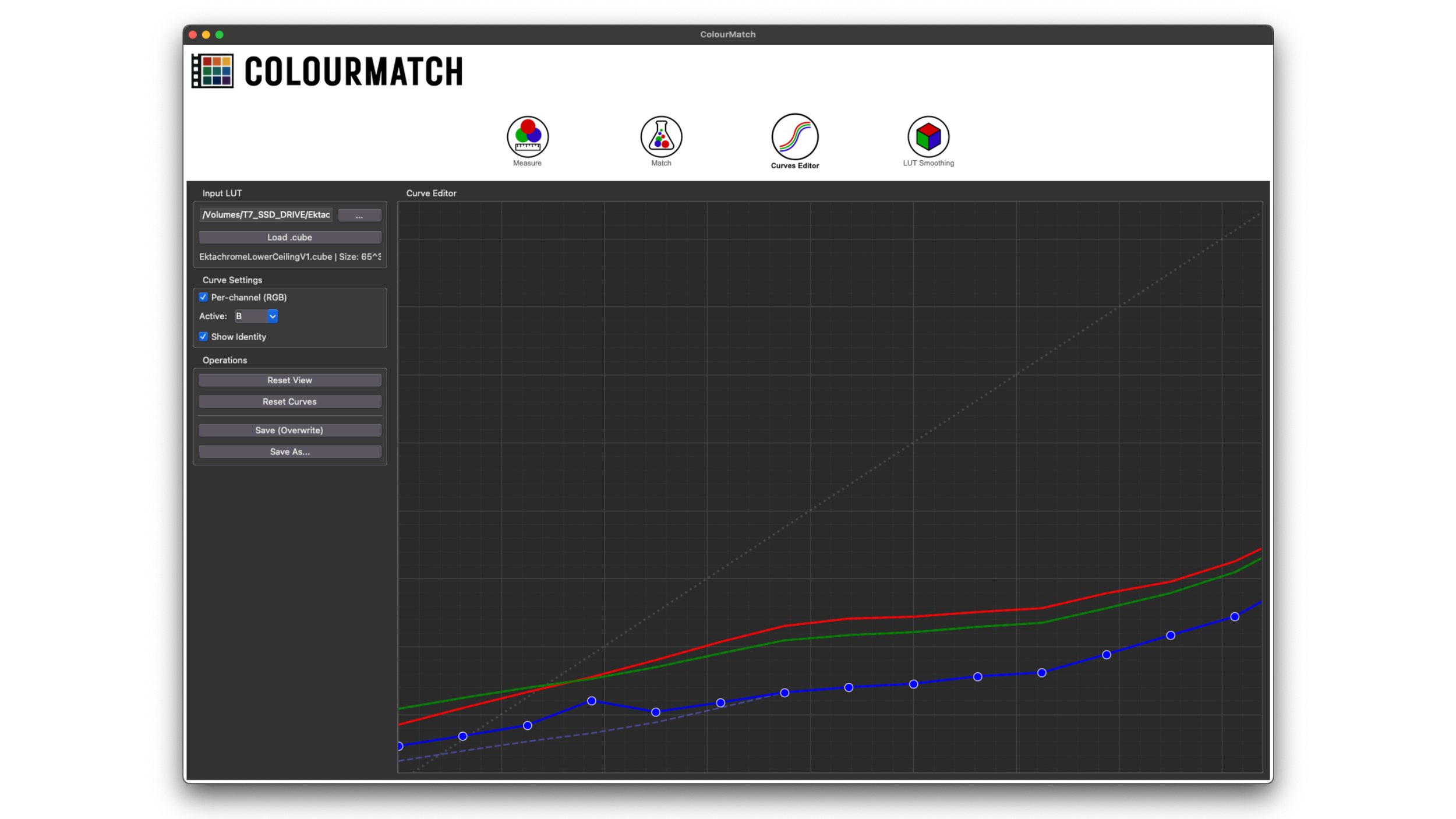
The Curve Editor allows you to "rewrite" the curves of a LUT, giving you precise control over its tonal response. Unlike standard grading tools that apply a correction on top of a LUT (which often crushes details), this tool modifies the LUT’s internal structure directly.
Why It’s Better: The "Relative" Engine
When you adjust a curve in ColourMatch, the software doesn't just overwrite your data. It calculates the difference between the original LUT and your new settings, then carefully applies that change to the 3D volume.
By rewriting the source file instead of stacking corrections on top, you maintain the purest possible signal pipeline.
While the ColourMatch algorithm is highly accurate, real-world data is rarely perfect. Noisy datasets or random outliers can sometimes cause the color transformation to "bend" unpredictably in specific tonal ranges. If the automated match creates unpredictable bends due to outliers in your datasets, you don't have to accept them. You can step in and redraw the curve manually, forcing the LUT to follow a smooth, logical response
LUT SMOOTHING
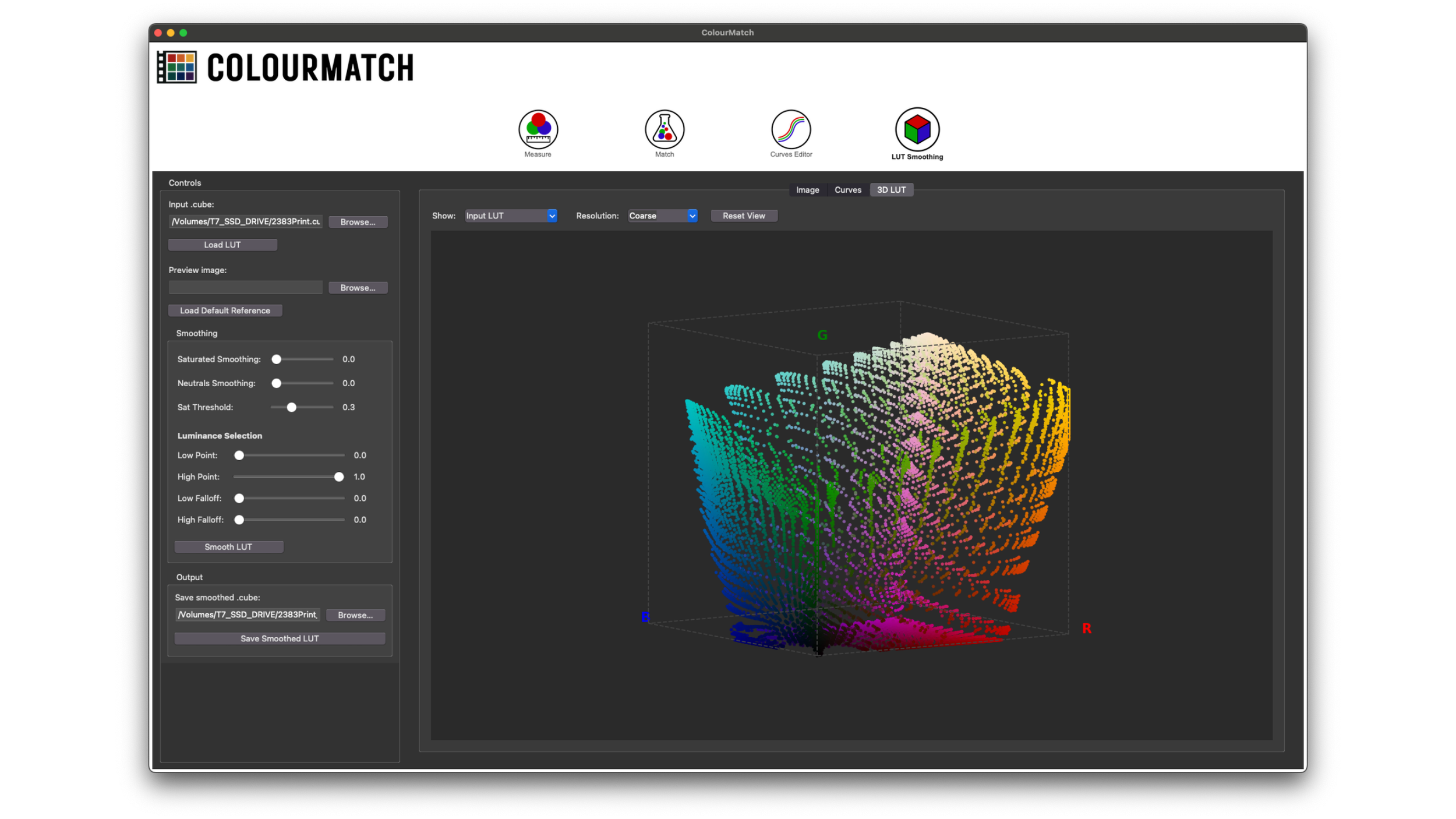
The LUT Smoothing tab is a powerful tool designed to salvage "bad" or technically flawed LUTs. It repairs profiles that break on gradients or exhibit jagged curves, common issues in many commercial LUTs that look creatively interesting but fail in rigorous production scenarios.
ColourMatch solves this by allowing you to "repair" these problematic areas using a specialized smoothing algorithm. Unlike simple global smoothing tools, ColourMatch offers localized precision.
Targeted Repair Controls:
Saturation vs. Neutrals: You can choose to smooth out only highly saturated colors to fix banding in deep hues, or focus solely on the neutral axis to repair jagged grayscale curves without affecting the rest of the color volume.
Luminance Masking: The tool allows you to isolate a precise luminance range for the operation. This enables you to surgically repair a LUT where it’s really needed.
The Result: You retain the specific character of the original look, but with the smoothness required for a professional pipeline.
You can see ColourMatch in action in the second part (bottom video) of the Matching Digital to Film class, which you can find here
Who is it NOT for?
As mentioned in the “WHO IS FOR?” section of this page ColourMatch is designed for Filmmakers, DOPs, and Colorists who require valid, data-driven color science in their workflow. ColourMatch is a scientific instrument. Therefore, it is not for:
1. Users Unwilling to Shoot Charts with Rigor: Our algorithms rely on measured data, not guesswork. To get the unprecedented accuracy we promise, you must be willing to shoot reference charts and perform the measurements in a rigorous way. If you are looking for a "one-click" magic solution that bypasses the preparation phase, this tool is not for you.
2. The "Set It and Forget It" Crowd This tool rewards precision. It is designed for professionals who treat color as a discipline—measuring values, create datasets, and verifying results. If you view technical preparation as a burden rather than a necessity, you will likely find the workflow demanding.
However, for those willing to do the work: We have designed ColourMatch to make this rigorous process as fast as possible. By packing the entire pipeline (Measuring, Matching, Curve Editing, and LUT Repair) into a single, compact interface, we have removed the headache from the science. We ensure that when you do decide to profile a camera or film stock, the process is streamlined, efficient, and has the lowest possible friction.
- Full access to all 4 tools
- 2 Seats per license
- Cancel anytime
- Full access to all 4 tools
- 2 Seats per license
- ~50% Savings vs Monthly
- No recurring fees
- Lifetime license
- 2 Seats per license
Color Science, Film Profiling and Look Development….Where can I learn?
As soon as I picked up a camera, I felt a barrier. There was a disconnect between the images I was capturing and the "look and feel" I experienced when watching a movie. For years, I looked for answers in the wrong places. Is it my lenses? My lighting?My sensor? I eventually realized that while those factors matter, the missing link was the pipeline to bring the uninterpreted data from the camera to the display.
In the days of film, the pipeline the defined the look of film, wasn't created by a colorist reinventing the wheel every single day. It was engineered into the chemistry of the stocks (both negative and print) and the cinematographer could trust the system to deliver nuance and complexity.
To bridge this gap, I created a comprehensive series of open classes free for all. You can find them HERE
My goal with these resources is to help you build that same level of engineering for your digital workflow. I want to empower you to understand what really happens to your image after you press the shutter, moving beyond the "black box" of standard plugins and diving into the raw science of image processing. I you want to follow along all you need to do is be curious and explore…I believe it will be incredibly rewarding
FAQ
Which Operating Systems are supported?
ColourMatch is currently a macOS exclusive. It is fully compatible with both Intel Macs and Apple Silicon (M1 to M4) devices running macOS 14 or newer. (compatibility with older macOS version will come soon)
What are the image file types supported?
The Measure Tool is designed for maximum compatibility with professional intermediate formats. It currently supports:
TIFF (.tif, .tiff) – 8-bit, 16-bit, and 32-bit (floating point).
DPX (.dpx) – The industry standard for digital intermediate and film scans.
OpenEXR (.exr) – Support for high-dynamic-range, linear-float data.
The 0–1 Domain Constraint
While the sampling tool can read high-dynamic-range values (beyond 1.0) from 32-bit TIFFs and EXRs, the Match Tabis built around the constraints of the standard 3D LUT container.
Standard .cube files operate strictly within a 0–1 normalized domain. Therefore, if your input images contain values far beyond 1.0 (clipping the LUT container), the resulting transformation may not behave as expected.
Technical Recommendation: For the most predictable results, we highly suggest using 16-bit TIFFs or DPX files that are Log or Gamma encoded. This ensures the entire dynamic range of your sensor is mapped into the 0–1 range before the matching algorithm begins its calculation.
Match Tab Compatibility
At this stage, the Image Mode within the Match Tab (used for extracting clusters directly from shots) supports TIFF files only.
However, keep in mind that the primary and most precise workflow for ColourMatch is Text Mode. This mode allows you to import clean, pre-measured data triplets from the Sampling Tab, giving you the highest level of control over the final mathematical transformation.
Why is ColourMatch better than a standard 3x3 Matrix or a CST (Color Space Transform)?
Most tools use linear math that fails to capture the non-linear "bends" in sensor and film behavior. ColourMatch uses volumetric warping to map the entire 3D space, capturing the subtle non linearities of digital sensors and the more accentuated non linearities of film stocks
Is the Perpetual License really a one-time payment?
Yes. The Perpetual License ($129.99) gives you a permanent seat for ColourMatch. There are no recurring fees or forced subscriptions. You own the tool for life, with a 1 year of updates.
How many computers can I use my license on?
Every ColourMatch license includes two (2) seats. This allows you to stay flexible by having the software activated on two different computers at the same time. You can always deactivate and reactivated licenses to run ColourMatch on a new machine.